


1 Rookie
•
2 Posts
0
172
September 24th, 2025 07:16
PowerEdge R740 show yellow light
Hi i got this dell r740 and led light always show yellow like this, anyone know how to fix this ?
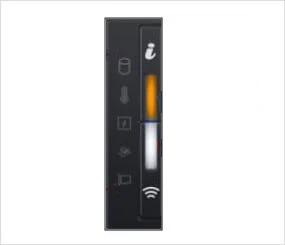
No Events found!
1 Rookie
•
2 Posts
0
172
September 24th, 2025 07:16
Hi i got this dell r740 and led light always show yellow like this, anyone know how to fix this ?
Top
DELL-Erman O
Moderator
•
2.9K Posts
0
September 24th, 2025 12:36
Hi,
It means
If your PowerEdge R740 is showing a yellow (amber) LED light, that usually means there's a hardware issue or system alert. I'd recommend checking the iDRAC system alerts and logs first they usually give you a good idea of what's going wrong. Also, make sure all your firmware is up to date (BIOS, iDRAC), as outdated firmware can sometimes cause weird behavior. Let us know what you find!
Origin3k
4 Operator
•
2.4K Posts
0
September 25th, 2025 04:57
@user_9a7ba4
There is a way to reset the iDRAC which means the iDRAC just reboots. This can be needed if the iDRAC is up and running for a long time.
Than there is a way of doing a factory reset of the idrac. If you do this all iDRAC settings will be gone
Both methods does not effect a running OS or its Data.
Is your ESXi up and running? If so you can install the iDRAC Tools for ESXi VIB which contains the "racadm" cli tool. With that you can display the iDRAC config, reset(reboot) if needed and also adjust every single option of your iDRAC or BIOS if needed.
Because you execute the racadmin as a "root" user of your OS you dont need to specify the iDrac user with its password.
user_9a7ba4
1 Rookie
•
2 Posts
0
September 25th, 2025 01:19
@DELL-Erman O Thank you for your response, I have one more question if i reset idrac module with the i button in front of R740 because i cannot connect to idrac website through the ip, does it reset the data inside too ? i have vmware installed inside the machine and access through localhost : https//: 192.xxx.xxx.xxx