

Unsolved
1 Rookie
•
10 Posts
0
72
December 7th, 2025 09:48
XR12 what cables need to connect all 6 NVME drives in direct connection for ZFS?
Hello Is here somebody who can confirm that is possible connect 6 NVME drives on XR12? I need create ZFS pool from 6 drives. My assumption is use onboard S150 what should be able to use. in NON- RAID configuration.
What cables (Part numbers( are needed to have it correct? I assume PWR cable will be same but the NVME cables will be connected from System board?
- SL2_CPU2_PA1 (PCIe cable connector)
- SL1_CPU1_PB1 (PCIe cable connector)
and on the Backplane
| BP_DST_PA1 (backplane NVMe connector, cable marking BP PA1) | SL2_CPU_PB1 (signal connector on the system board, cable marking MB PB1) |
| BP_DST_PB1 (backplane NVMe connector, cable marking BP PB1) | SL2_CPU_PA1 (signal connector on the system board, cable marking MB PA1) |
shod be connected only one cable or both?
Any help will be great.


No Events found!
DELL-Young E
Moderator
•
5.4K Posts
•
37 Points
0
December 8th, 2025 05:27
Hello thanks for choosing Dell. This is what I found.
2.5-inch backplane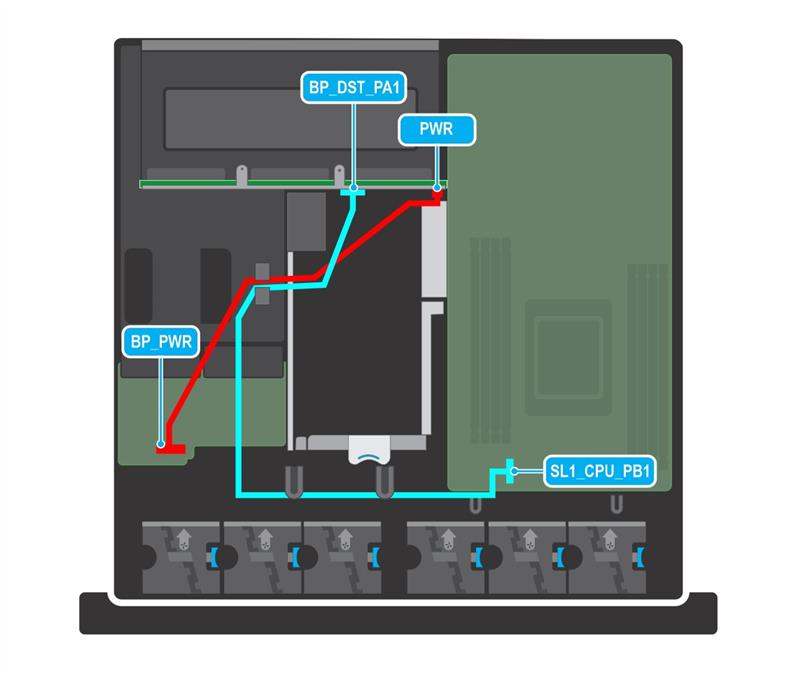
https://www.dell.com/support/manuals/en-ht/poweredge-xr12/pexr12_ism_pub/cable-routing?guid=guid-fe…
shod be connected only one cable or both? -> only 1 is fine
https://dl.dell.com/content/manual26808573-dell-poweredge-raid-controller-s150-user-s-guide.pdf?lan…
S150 does support non- RAID however please note that it's up to 4 NVMEs, not 6.
Respectfully,
Mementh
1 Rookie
•
10 Posts
0
December 8th, 2025 06:03
@DELL-Young E Hello I disagree with your answer. Because im refrain the same documentation and know the I other solution is possible connect more NVME disks.
This is from same documentation on page 8.
Table 5. Virtual disk specifications for PERC S150 with NVMe configuration
Specification PERC S150
Maximum number of physical disks supported 30
Maximum number of virtual disks supported 30
NOTE: The maximum number of virtual disks may exceed 30 when physical disks are migrated from any other
configuration or a disk in Ready state is converted to a non-RAID disk.
Maximum number of virtual disks supported from a single
disk group
8
NOTE: Maximum number of virtual disks can exceed more than 8 from a single disk group as there is no constraint from
PERC S150.
Who tell me the truth?
This is the reason why im asking about Cables.
Is about physical connection to the Mainboard and enough PCIE lanes.
(edited)
Mementh
1 Rookie
•
10 Posts
0
December 8th, 2025 06:26
Anyway , who can give me answer what Dell PN of cable/s I need if I want switch from SAS configuration what are now connected with HBA355i to backplane?
DELL-Young E
Moderator
•
5.4K Posts
•
37 Points
0
December 9th, 2025 06:22
Hi, S150 does not work alone we have specific configurations with it when it’s plugged to a server. So you have to refer to the information I gave.
Mementh
1 Rookie
•
10 Posts
0
December 9th, 2025 06:25
@DELL-Young E Hello Thank You for the information. Where I Have the Cable part number for connection the 4 NVME drivers, if you replied please?
DELL-Young E
Moderator
•
5.4K Posts
•
37 Points
0
December 9th, 2025 06:27
For the parts related inquiries please visit Find Parts & Upgrades for Your Dell Computer & more | Dell USA It is best to get in touch with sale as it is best that you get Dell certified parts. We cannot guarantee its function for a 3rd party part components.
Mementh
1 Rookie
•
10 Posts
0
December 10th, 2025 12:28
@DELL-Young E This is what I tried First. Nothing there if I clic on the parts store. Second point is Im in Europe not u US so here sales suport not will help me. This I the main reason to get the Dell P/N for cables to try contact Dell in Europe the even get cables is possible. My first reply was that they don't know and want sell me new Server what is not needed.
DELL-Marco B
Moderator
•
4K Posts
0
December 10th, 2025 14:29
Sorry our team is only related to technical support and break and fix query.
We cannot manage sales request or part number information.
Thanks
Mementh
1 Rookie
•
10 Posts
0
December 10th, 2025 15:21
@DELL-Marco B Thank You for your "support" On other Dell post what try to get information your posted Dell Numbers and have no problem to provide. Can I assume if will be somebody willing to help?
DELL-Chris H
7 Practitioner
•
9.7K Posts
•
48K Points
0
December 10th, 2025 15:37
While the others are correct, we are more break fix than sales and that we don't support configuration changes, I believe the part numbers you are looking for are part # TX79R and N16D4.
Hope this helps.
Mementh
1 Rookie
•
10 Posts
0
December 10th, 2025 15:46
@DELL-Chris H Thank You for the help, will try to reach out to Europe Dell support if this cables are even possible to buy here.