

Unsolved
1 Rookie
•
1 Message
0
42
April 2nd, 2026 21:01
m18 R1, AWCC 6.x, FX issue
I have recently updated all of the drivers and updates on my Alienware M18 R1 (listed on the support page for my specific service tag), including the following:
- Intel HID Event Filter Driver
- Intel Chipset Device Software
- Alienware m16 R1/m18 R1 System BIOS
- NVIDIA GeForce RTX 4050/4060/4070/4080/4090 Graphics Driver
--and of course the latest Alienware Command Center update. I can't remember the exact order I installed these, I believe it was the order they were listed, except the BIOS I know I updated last. I restarted my computer after each update.
Anyway my problem is that when I restarted my computer, a brief message popped up before the computer finished booting up and said something along the lines of: "error, keyboard language/color not defined". So I looked up the issue and then tried going into my BIOS settings. I changed the language to "UK-English" and the color to "white" (both of these are not correct for me), hit save changes, and then reverted the changes and saved again. I booted up my computer again and for a few seconds the rainbow wave effect worked perfectly, but then the same error came up again, and the F1, F12, mute, and mute mic keys stayed white. I tried to change the entire keyboard to a different color, but it didn't change the result. In addition to this, my backslash key, right windows key, and right alt key were also stuck off. Also, after this, when I went through a whole slew of troubleshooting procedures, most of the time when I restarted the computer, one of the two LEDs under each individual function key were stuck white, while the other LED for each affected key and the rest of the keys went through the whole rainbow wave. I've done a lot more troubleshooting since, and here's where I'm at now:
The problematic keys are different depending on the effect that I set all the keys to versus when I set the key color.
Breathing - every key works exactly as it should
Spectrum - same thing
Rainbow Wave - this one is where it gets weird. When I set it to Rainbow Wave in the AWCC, most of the keys work, except for every top row key, the right side LED is set to white, and doesn't change. F1, F12, mute, and mute mic keys are the same way, UNTIL I toggle them. When I toggle on F1, mute, or mute mic, they change to white as they should. When I toggle them again, the right side LED in each of them is either off or extremely dim. F12 for some reason, although it behaves the same in every other way to these other 3 keys, doesn't change to white, or change back in the way that F1, mute, or mute mic keys do. Also, the "+" and "=" on the numpad on the far right are stuck white in Rainbow Wave as well.
Scanner (Night Rider) - a lot more difficult to tell if anything is malfunctioning but everything seems to be working as it should
Static Default Blue - Every key other than F1, F12, mute, and mute mic works. Those four keys are stuck white. When I toggle them it's difficult to tell but it seems as though they get the slightest bit dimmer/brighter.
I apologize for such a long-winded post but I wanted to describe my issue as perfectly as possible, to hopefully make finding a solution easier. Since I know AlienFX and AWCC have had a lot of issues, I figured I'm probably not the only one with a similar lighting issue, especially since the Event Filter Driver (which may have some impact) and AWCC had an update at similar timing. This is more so for documenting purposes rather than looking for a fix, but hey, any insight is welcome. I am fine at the moment leaving my keyboard a bit more boring, but if anyone has a solution I'm all ears.
DELL-ChrisM2
Community Manager
•
1.2K Posts
0
April 4th, 2026 21:54
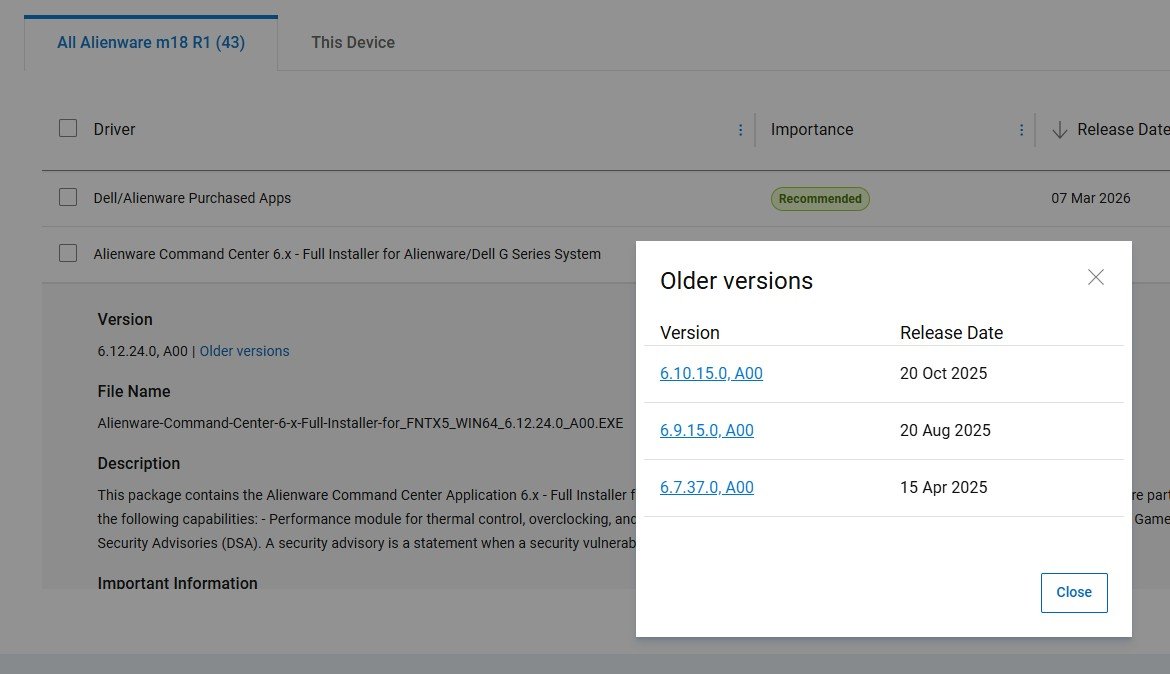
Assuming that you installed the Full Installer version of AWCC 6.12.24.0?
You also have the option of uninstalling it and installing Older versions 6.7.37.0, 6.9.15.0, 6.10.15.0 to test =
(edited)